RaceTrac
- 4.8
- Rating
- 1.00M
- Installs
- Free
- Price
 Analysis by App-foxy
I approached RaceTrac as a practical shopping companion rather than a general-purpose payment or budgeting tool. Its main idea is straightforward: help me earn, follow, and redeem points when I use RaceTrac. That narrow focus is also its biggest strength. I do not have to sort through unrelated shopping offers or manage a broad rewards wallet. When my routine already includes RaceTrac, the app gives that routine a clearer rewards layer.
The app comes from RaceTrac, Inc and is free to use. It is listed for Everyone, so its basic concept is easy to understand for a wide range of users. The current release is version 8.19.3, and the app requires iOS 11 or later. On the popularity side, it has passed one million installs, with an average rating of 4.8 from around twenty-five thousand ratings and roughly seven thousand two hundred written reviews. Those figures suggest that the core experience works well for many people, although they should not be mistaken for a guarantee that every location or every individual routine will feel equally convenient.
What to expect before you start
The first thing to understand is that RaceTrac is most useful when I already visit RaceTrac often enough for points to matter. It is not designed to replace a supermarket rewards program, compare prices across retailers, or organize all of my shopping in one place. Instead, it concentrates on the RaceTrac relationship: earning points through eligible activity, keeping track of progress, and using those points when redemption makes sense.
You May Also Like

 Google Keep - Notes and lists
Google Keep’s Quiet Growth Shows the Appeal of Simpler Notes
As mobile work gets busier, Google Keep keeps winning a simple contest: capture a thought quickly, find it later, and get on with the day.

 Blood Strike: 2.5 Anniversary
Blood Strike’s Loadouts Turn Every Drop Into a Tactical Gamble
A close look at Blood Strike’s custom loadouts: how fast access to signature weapons reshapes its battle royale rhythm, rewards preparation, and narrows the gap between fights.

 Pandora - Music & Podcasts
Pandora’s Music Is Easy to Start, but Harder to Recover
Pandora’s strength is its low-effort path from a seed to a station. Its weak spot is how much confidence it asks you to place in connection, setup, and quiet recovery.

 8 Ball Pool
 Is Built on Rivalries, Rematches, and Routine
A close look at the rivalries, rematches, shared routines, and unanswered safety questions that turn a quick pool match into a persistent mobile community.

 Samsung Music
’s Quiet Strength Is Playing What You Already Own
Its reach comes less from spectacle than from dependable access to a personal library. That simplicity is both the app’s strongest retention engine and its ceiling.

 AccuWeather: Weather Radar
AccuWeather Review: A Quick, Clear Forecast for Everyday Decisions
For everyday plans, the best forecast is the one you can understand quickly. AccuWeather makes rain timing, radar, and local conditions easy to act on, with a few trade-offs.
More From Our News Desk



That makes the app a good fit for commuters, local drivers, and anyone who regularly stops at RaceTrac for fuel, drinks, snacks, or other everyday purchases. A person who visits only once every few months may find the app less compelling because the benefit depends on building a habit. The free price removes the financial barrier, but the real question is whether the app fits naturally into the places I already shop.
I also found it helpful to treat the app as a record-keeping tool, not as an excuse to buy more than planned. Rewards can make a routine purchase feel more worthwhile, but they can also encourage unnecessary stops if I focus too heavily on collecting points. My best experience came from using it after deciding what I needed, then letting the rewards accumulate in the background.
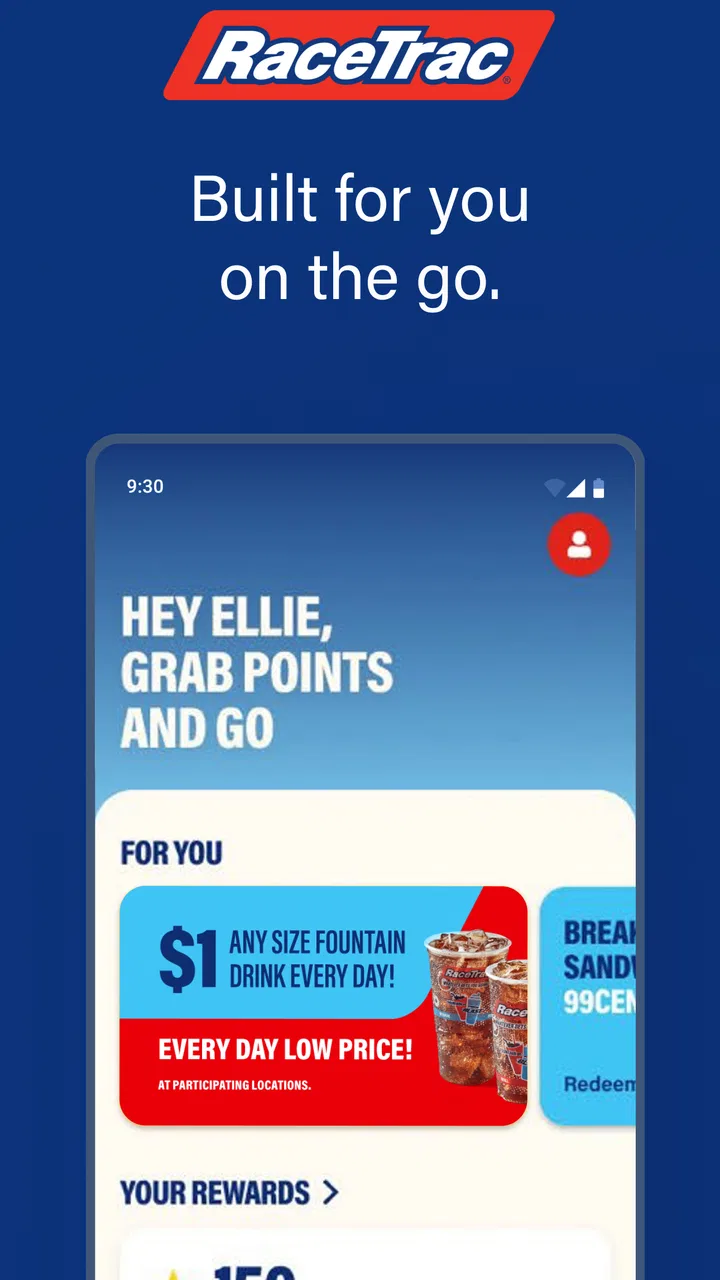
The interface is easier to appreciate when I have one simple goal: make sure a normal RaceTrac visit contributes to my rewards balance. Trying to understand every possible option immediately is less useful. A new user should first learn where the points balance appears, how a visit is connected to the account, and where redemption begins. Once those steps are familiar, the rest of the app feels less intimidating.
Who will get the most from it
I would recommend it first to people who already make frequent RaceTrac stops. For them, the app can turn a repeated errand into a more visible rewards routine. It is especially practical for someone who wants to check progress without keeping receipts or relying on memory. Seeing the balance in one place makes it easier to decide whether to redeem now or continue saving.
It is less suitable for someone who wants a single app covering several fuel brands, restaurants, grocery stores, and online retailers. A broad cashback service may be a better match for that person, even if its rewards rules are less focused. Likewise, if I rarely visit RaceTrac, I would not install this solely because the rating is high. The value comes from repeated relevance, not from having another app on the phone.
One useful trade-off is simplicity versus range. A dedicated rewards app can be easier to understand than a large shopping platform, but it naturally has fewer reasons to open it. I prefer the focused approach when I know I will use RaceTrac regularly. If my shopping habits change from week to week, a general rewards wallet may offer more flexibility.
Setting up the account without overthinking it
For a first-time user, I would begin by installing the app and creating or accessing the account used for the rewards activity. The important practical point is consistency: I should use the same account each time rather than switching between different sign-in details. A fragmented account history can make an otherwise simple points system feel confusing.
After signing in, I would immediately look for the current points balance and the area that explains how points are earned. This is more useful than browsing randomly. It gives me a baseline before my first meaningful visit and helps me recognize whether a later change looks normal. I would also take a moment to understand the redemption screen before I have points ready to use, because knowing where to go prevents hesitation at the moment I want to redeem.
The app’s store summary is centered on earning, tracking, and redeeming points, so I would keep those three actions in mind as a setup checklist. If I can locate each one, the account is ready for everyday use. I do not need to memorize every rule on the first day; I only need to know where the relevant information lives.
A small but important habit is to check the account before assuming a visit has been recorded. This is not about repeatedly refreshing the screen. It is about learning how the app presents progress and noticing whether the balance changes immediately or after some processing time. Once I know what normal updating looks like, I am less likely to panic when the points do not appear at the exact moment I leave the store.
Making the first useful visit
The first successful action should be deliberately simple. I would make a normal RaceTrac purchase, follow the app’s instructions for connecting that activity to the rewards account, and then return to the points area to confirm that the visit is reflected. The goal is not to maximize the first transaction. The goal is to prove that the account, the visit, and the points history are connected.
This is where the app becomes more than an icon on my phone. Before that moment, I am only reading screens. Afterward, I have evidence that the rewards workflow fits my routine. I would avoid combining the first test with an unusually complicated purchase or a rushed stop. A calm, ordinary visit makes it easier to identify whether any issue comes from setup, account selection, or the transaction itself.
Once the balance updates, I would open the redemption area and read the available instructions even if I am not ready to use the points. This is one of the most useful early steps because it changes redemption from a vague promise into a known process. I want to understand what the app asks me to do before I am standing at a counter deciding quickly.
My recommended first-week workflow is simple:
- Open the app before a planned RaceTrac stop and confirm that I am using the intended account.
- Complete the visit normally instead of buying something extra just for points.
- Check the points history afterward and learn how the new activity is displayed.
- Review redemption instructions before saving enough points to feel pressured to use them.
This approach gives a first-time user a meaningful success without turning rewards into a chore. It also creates a useful reference point for later visits. If something looks different in the future, I have already seen how my own account normally behaves.
A realistic everyday scenario
Imagine that I commute several days a week and stop at RaceTrac for fuel and a drink. Without the app, I would complete those purchases and move on, possibly forgetting whether any rewards were attached. With RaceTrac, I can make the same planned stop, check that the activity belongs to my account, and monitor the points over time. When I eventually have a redemption opportunity, I can decide whether it is worth using then or saving for later.
The important detail is that the app does not need to change my route to be useful. It works best as a quiet addition to an existing habit. If I have to make special trips, remember complicated workarounds, or constantly check the screen, the rewards may not justify the effort. The strongest use case is ordinary repetition with minimal extra attention.
Where new users may get confused
The word “points” can create unrealistic expectations. I would not assume that every purchase automatically produces the same result or that the balance must update instantly. The safest approach is to read the earning guidance inside the app and use the points history as the source of truth for my account. That habit avoids making decisions based on memory or on what I think a rewards program should do.
Another common source of friction is opening the app only when I am already ready to redeem. That is too late to learn the process comfortably. I prefer to explore the redemption section early, when there is no pressure. This also helps me distinguish between checking my balance and actually applying points. They are related actions, but they serve different purposes.
Account consistency matters as well. If more than one person uses the same device or if I have several login details, I would verify the active account before expecting a visit to appear in the right history. This is an easy step to skip, especially during a quick fuel stop, and it can lead to the mistaken impression that points have disappeared.
Timing can also affect expectations. A balance that does not change immediately is not automatically a failed transaction. I would first give the account time to reflect the activity, then review the history and the app’s own guidance. If the record still does not look right, keeping the transaction details available would make any support conversation more productive than simply saying that the points are missing.
There is also a behavioral limitation: the app can make small purchases feel more rewarding than they really are. I try to separate the value of the item from the value of the points. If I would not buy something without the rewards, I probably should not buy it merely to advance a balance. That is a personal discipline the app cannot provide for me.
How it compares with ordinary alternatives
The usual alternative is doing nothing and treating each RaceTrac visit as a one-off purchase. That is simpler, but it also means I have no dedicated place to follow progress or plan a redemption. For regular customers, the app adds a useful layer without requiring a separate spreadsheet or a collection of paper receipts.
Another alternative is a general cashback or shopping-rewards app. Those services may cover more merchants, which is valuable for people whose routines are spread across many brands. However, broader coverage can come with more screens, more offer types, and more rules to interpret. RaceTrac’s focused design is preferable when my goal is specifically to manage RaceTrac points rather than optimize every purchase I make.
A bank card’s own rewards program is a different comparison. Card rewards may be more automatic and may apply across many stores, but they do not necessarily provide the same dedicated view of RaceTrac activity. I see the two approaches as complementary rather than mutually exclusive: a person may use a payment card for its benefits while still using the RaceTrac app to follow the store-specific points.
The trade-off is clear. This app is more relevant than a general rewards tool during a RaceTrac visit, but less useful everywhere else. I would choose it for focused tracking and redemption, not as my only shopping-rewards solution.
Using the app more intelligently over time
Once the first visit is recorded, I would stop checking the app after every purchase unless I am troubleshooting. A better workflow is to use it at three moments: before a planned stop to confirm the account, after the visit to verify the activity, and when deciding whether to redeem. That keeps the app helpful without allowing it to become another notification-driven habit.
Tracking the balance can also help me make a more informed redemption decision. If I redeem every time the option appears, I may enjoy quick small benefits. If I save, I may prefer having a larger balance available later. The right choice depends on how often I visit and how much mental effort I want to spend managing rewards. The app gives me visibility, but the decision remains personal.
I would also use the history as a lightweight audit trail. If I notice a pattern that does not match my routine, I can investigate while the visit is still easy to remember. This is more practical than waiting several weeks and trying to reconstruct every stop. The history is valuable not only for celebrating points, but also for spotting misunderstandings early.
For families or shared households, I would agree on one account routine before several people begin using the app. The more people involved, the more important it becomes to know which account receives the activity and who is making redemption decisions. A little coordination can prevent duplicate expectations and arguments over where the points went.
On the technical side, I would keep the app updated when a newer release is offered, while remembering that the current version is 8.19.3 and that iOS 11 or later is required. The operating-system requirement is comfortable for many iPhone users, but anyone using an older device should check compatibility before building the app into a daily routine. Since the app is free, the main cost is not money; it is the attention needed to use the rewards process correctly.
When I would skip it
I would skip RaceTrac if I almost never visit the brand, if I dislike managing separate loyalty accounts, or if I already use a broader rewards system that gives me enough value with less effort. I would also avoid installing it solely because it has a strong average rating. A high rating tells me that many users are satisfied, but it does not change the basic question of whether RaceTrac is part of my normal shopping life.
I would be cautious if I expect a universal payment wallet, detailed household budgeting, or rewards from many retailers. That is not the role I would assign to this app. Choosing the right tool means matching its focused purpose to my needs rather than expecting one store’s app to solve every shopping problem.
My recommendation for a first-time user
My advice is to install RaceTrac only when you can name a real upcoming use for it. Create or access the account, locate the balance and redemption areas, then test the process during a normal visit. Do not make an extra purchase just to experiment, and do not judge the app until you have seen how one ordinary transaction appears in your account.
After that first successful action, the app becomes easy to evaluate. If you visit RaceTrac regularly and appreciate having points organized in one place, it is a sensible free addition to your phone. If your visits are rare or you want rewards across many stores, a broader alternative may serve you better. The best reason to use RaceTrac is not the promise of points by itself, but the convenience of fitting those points into a routine you already have.
In my experience, the app works best when I keep expectations practical: use it to earn, track, and redeem RaceTrac points, verify activity calmly, and avoid letting rewards dictate purchases. That combination makes the experience feel useful rather than demanding. For the right customer, it is a focused shopping app with a clear purpose and a manageable path from installation to the first meaningful reward.
FAQs for RaceTrac
01What is RaceTrac and what does it offer to users?
RaceTrac is a user-friendly app designed to enhance your convenience store experience. It provides features like locating the nearest RaceTrac store, checking fuel prices, and accessing exclusive deals. The app aims to streamline your visit to RaceTrac by offering digital rewards and promotions directly to your smartphone.
02How can I find the nearest RaceTrac location using the app?
The RaceTrac app includes a built-in location finder that uses your phone's GPS to identify the nearest RaceTrac stores. You can access this feature from the main menu, and it will provide directions, store hours, and available amenities to ensure a smooth visit.
03Are there any rewards or loyalty programs available in the RaceTrac app?
Yes, RaceTrac offers a loyalty program through the app where users can earn points for purchases. These points can be redeemed for discounts and free items. The app frequently updates with new promotions, ensuring that loyal customers receive the best value for their purchases.
04Is it possible to check fuel prices and availability through the RaceTrac app?
Absolutely! The RaceTrac app allows users to check real-time fuel prices at their nearest locations. This feature helps you make informed decisions about where to fuel up, saving both time and money. Additionally, the app may offer promotions on fuel purchases from time to time.
05Does the RaceTrac app support mobile payments or pre-ordering?
Currently, the RaceTrac app does not support mobile payments or pre-ordering. However, it prioritizes offering users detailed information about store offerings and promotions. Keep an eye on app updates, as RaceTrac may introduce these features in future releases.
Pros
- User-friendly interface for easy navigation.
- Real-time fuel price updates for savings.
- Loyalty rewards for frequent customers.
- Customizable notifications for promotions.
- Wide variety of products in-store.
Cons
- Occasional glitches with location services.
- In-app ads can be intrusive.
- Limited payment options available.
- Account setup is somewhat lengthy.
- Some features require stable internet.

RaceTrac
Gallery